Loading 3D model...
0%
(クリック/タップ位置の座標が表示されます)
PC: 座標モードONでクリック(または Shift+クリック)SP: 座標モードONでタップ
Point A (Left Side)
Suggested retail price: 405,900 yen (unit price: 369,000 yen)
Flat-rate service plan: 3,090 yen per month (tax included)
Dimensions (mm)
Height 750 × Width 480 × Depth 250
Standard capacity
Hot water supply: 24–2.0 (constant 60°C output type)
Maximum heating capacity
14.0 kW (12,000 kcal/h)
Flat-rate service plan: 3,090 yen per month (tax included)
Dimensions (mm)
Height 750 × Width 480 × Depth 250
Standard capacity
Hot water supply: 24–2.0 (constant 60°C output type)
Maximum heating capacity
14.0 kW (12,000 kcal/h)
Source Image for the 3D Model
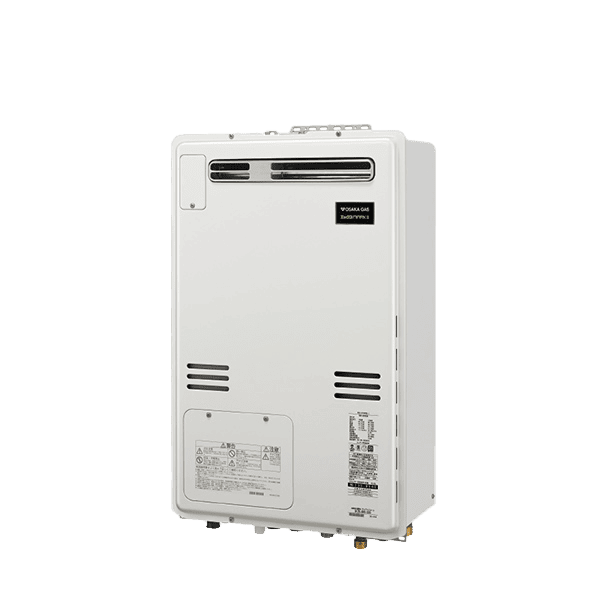
This 3D model was generated based on the product image published on the website above.
It uses only a single, relatively small 600 × 600 px image taken from a front three-quarter angle, so the back side is not visible at all.
In addition, the text on the front panel is very fine, and at this resolution it cannot be clearly read.
We intentionally used such a limited image in order to see how far the AI can reconstruct a 3D model from restricted information.
It uses only a single, relatively small 600 × 600 px image taken from a front three-quarter angle, so the back side is not visible at all.
In addition, the text on the front panel is very fine, and at this resolution it cannot be clearly read.
We intentionally used such a limited image in order to see how far the AI can reconstruct a 3D model from restricted information.
Impact of Low-Resolution Images on Recognition and AI Completion
This 3D model exhibits several reproduction errors because the amount of information in the input image was limited.
The original photo used was a small 600 × 600 px product image that showed only part of the front side, with almost no detailed information about the sides or the back.
In general, AI-based 3D generation infers and fills in “unseen surfaces,” so it is common for protrusions or shapes that differ from the real product to appear on the back side.
In this particular case, however, the back happened to be interpreted as flat, so no incorrect bumps or extra structures were generated.
On the other hand, the text on the front panel could not be read due to the low resolution, and has been reconstructed as shapes that look like “distorted or different characters.”
Because AI has difficulty restoring very fine text and micro details, elements such as lettering are prone to being misinterpreted and regenerated incorrectly.
The original photo used was a small 600 × 600 px product image that showed only part of the front side, with almost no detailed information about the sides or the back.
In general, AI-based 3D generation infers and fills in “unseen surfaces,” so it is common for protrusions or shapes that differ from the real product to appear on the back side.
In this particular case, however, the back happened to be interpreted as flat, so no incorrect bumps or extra structures were generated.
On the other hand, the text on the front panel could not be read due to the low resolution, and has been reconstructed as shapes that look like “distorted or different characters.”
Because AI has difficulty restoring very fine text and micro details, elements such as lettering are prone to being misinterpreted and regenerated incorrectly.
Point B (Top Surface)
When using hot water such as in a shower, always check the temperature shown on the remote control and confirm the water temperature by hand before use.
To prevent burns
・Be especially careful when using the appliance again after having used it at a high temperature such as 60°C.
・Even if the temperature is normal at the beginning of use, the water may become hotter while in use. If very hot water comes out, stop using the appliance immediately.
If the water continues to become hot during use, the appliance may be malfunctioning. In that case, please contact your dealer or your nearest Osaka Gas service office.
・In summer, when the feed-water temperature is high, or when you reduce the hot-water flow, the actual temperature may become higher than the set temperature. In such cases, increase the hot-water flow or mix in cold water first, then check the temperature before use.
To prevent burns
・Be especially careful when using the appliance again after having used it at a high temperature such as 60°C.
・Even if the temperature is normal at the beginning of use, the water may become hotter while in use. If very hot water comes out, stop using the appliance immediately.
If the water continues to become hot during use, the appliance may be malfunctioning. In that case, please contact your dealer or your nearest Osaka Gas service office.
・In summer, when the feed-water temperature is high, or when you reduce the hot-water flow, the actual temperature may become higher than the set temperature. In such cases, increase the hot-water flow or mix in cold water first, then check the temperature before use.